WhatsApp, Waze, Uber and Your Bank on a Kosher Phone: The App-by-App Guide
Yes, a kosher phone that keeps apps can keep the ones a family truly needs: WhatsApp, maps, rides, the bank, email and music. Look at each app as two things: the job you need it for, and the extras built around it. WhatsApp's chats are the job; Status, Channels and forwarded videos are extras. Decide app by app, and test each one on day one.
Every app has two parts
Ask any family what they need on a kosher phone and the list comes back almost the same every time. When we read 319 questions and comments from 96 forum and news pages, from 2010 to 2026, it was: WhatsApp, Waze or Google Maps, email, Uber, the bank, the camera, music and shiurim. Each missing app on that list was a reason to keep an open smartphone, or to carry two phones.
The way through is to stop thinking of apps as "allowed" or "not allowed", and to see that most apps have two parts:
- The job. The reason you opened it: a message to your sister, directions to a wedding, a car home, a transfer to the landlord.
- The extras. The parts built around the job to keep you in the app longer: stories, suggested videos, photo feeds, public channels, "people also watched".
Almost every family wants the job. Families differ enormously about the extras. A good kosher phone lets you keep the first without being handed the second.
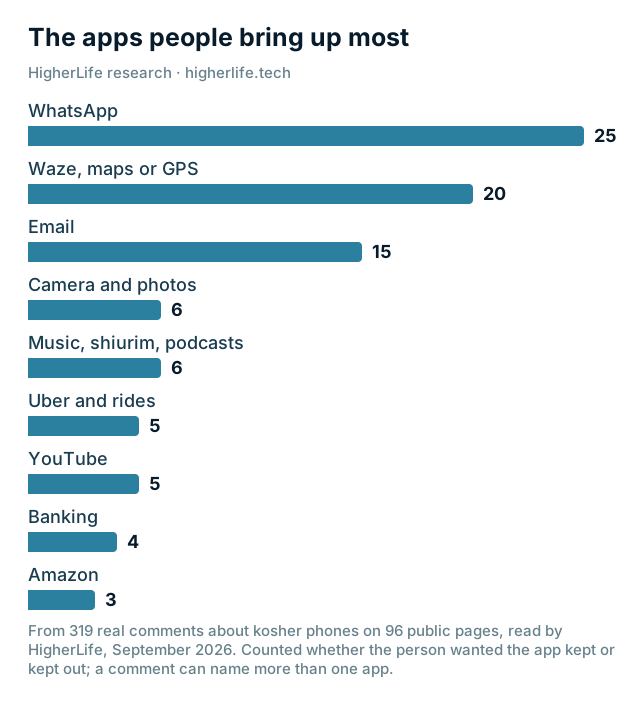
No app came up more often, and no app split families more sharply. One woman wrote that "the one thing I'm having a hard time giving up is whatsapp." Another: "I have a lot of international family and it's the only way to communicate with them." And from the other side, just as firmly: "I think kosher phone w WhatsApp is an oxymoron," and "I absolutely do not want whatsapp, because that is one of the biggest problems for me!"
Both sides are right about something, because WhatsApp is really three things in one app:
- Messages. Chats with family and friends, voice notes, the school's parent group, the class group, the shul. For many families this is simply how life is organized now.
- Updates. Status posts from your contacts, and Channels: public broadcasts from organizations, news outlets and public figures. This is the part built like a feed.
- What people forward. Pictures and videos shared in large groups, often by people you do not know well, which arrive whether you asked for them or not.
Families who keep WhatsApp usually keep the first and try to limit the second and third. Inside WhatsApp's own settings you can already do some of that yourself:
- Stop automatic downloads. In WhatsApp's settings, under Storage and data, Media auto-download, set photos, audio, video and documents to "Never". WhatsApp's own help says what that means: "You will need to manually tap each file to download it." Photos and videos then show only as a small blurred preview until you tap to download them.
- Stop saving group media to your photos. WhatsApp's own help says it plainly: "Save to Photos is turned on by default." Turning it off (Settings, then Chats) keeps forwarded pictures out of the family album.
- Mute or leave the large groups. Most forwarded content comes from a handful of big groups.
- Think about read receipts. One forum member described the pressure plainly: when the app shows that you read a message, "you feel pressure to reply immediately," even during davening, learning or family time. You can turn read receipts off. Our first-phone guide covers WhatsApp for children.
What a family should ask of any kosher phone setup is whether it can keep WhatsApp's messages while leaving out the parts they do not want, and what happens to pictures and videos that arrive in chats. Ask it in those words, and ask to see it.
Waze and Google Maps
Directions are not a luxury. For anyone who drives, getting lost is its own danger, and for anyone who takes a car service, a map is how you know where you are. Most families treat navigation as essential.
The job here is directions and traffic. The extras are the photos of places, reviews and the "explore" parts, which in some map apps include pictures uploaded by the public (Google Maps lets anyone "post photo or video updates about a place"). If your family cares about that, it is worth knowing that navigation-first apps show far less of it than full map apps, and that you can keep one and leave out the other.
Test it: plan a real route, start it, and make sure the voice directions and the traffic updates work.
Uber, Lyft and the car service
Ride apps are almost entirely "job": a map, a car and a payment. They usually need only a sign-in code and a payment method. What to watch is sign-in (they text a code to your number) and payment (the card and any wallet you use). Many local car services still take phone calls, which some families prefer anyway.
Test it: open the app and see a car on the map. You do not need to book one.
Banking apps and the code the bank texts you
Banking is where a badly set-up phone causes the most real damage. Almost every bank now checks that it is really you with a one-time code sent by text message, or with an approval inside its own app. If either of those stops working, you are locked out of your own money at the worst possible moment.
- Keep the bank's own app, and make sure it opens and signs in.
- Keep ordinary text messages working. That is where the code arrives.
- Payment apps inside the bank (such as sending money to a friend) usually live inside the bank's app and come with it.
- If your bank uses a separate security app, put it on your keep list by name.
Test it: sign out of the bank's app and sign back in, so the code has to arrive.
Email is essential for most adults and for work. Its job is your messages. Its extras are the pictures inside promotions and newsletters, which load from the internet when you open them. Most email apps let you stop pictures from loading automatically, so an email shows its words first and its pictures only if you ask. For many families, that one setting makes email calm again.
It also helps to unsubscribe from the stores and newsletters you never read. It is the email version of leaving a big WhatsApp group.
The camera and your photos
"And what do u do for a camera? Do u just not take pictures?" someone asked on a forum, about life with a basic phone. It is a fair question, and one of the strongest reasons families keep an iPhone. The camera has no extras to worry about. Your own photos are your own.
Two things are worth deciding:
- Backup. Make sure photos are backed up, whether to Apple's iCloud or another service. Losing years of family photos is worse than any setting.
- What arrives in the album. Pictures from WhatsApp groups can land in your photo album automatically. Turn that off in WhatsApp (see above) so the album stays your own.
Shiurim, music and podcasts
For many people, the phone is where they learn and what they listen to in the car. "Is there such a device that has Waze and shiurim and music?" one woman asked. On an iPhone, the answer is yes. Music and learning apps are mostly "job". The extras to watch are video (some music and podcast apps now show videos too) and the open search inside some apps. Choose apps whose library fits your home, and decide whether video inside them is part of your plan.
A simple rule families use: audio yes, video only where you chose it.
Video
Video is the hardest category, and the one where families differ most. Open video platforms are built around an endless stream of suggestions, and many kosher setups leave them out. Some families want to be able to watch a specific shiur, a school recording or a how-to once in a while. "I occasionally want to see a youtube video for something," one woman wrote. Decide in advance which of these your home needs: no video, video only from sources you chose, or more. Then ask any setup exactly what it does with video, and test it.
The work phone
For many men and women, the phone is the office. A realtor told Mishpacha: "It's a daily struggle that I'm always working on, especially because my entire business is on my phone." Work is the most common reason people give for keeping an open smartphone. Plan for it from the start:
- List your work apps by name: email, calendar, video calls, the team chat, the company's own app, the password manager, the security app.
- List the websites you need: the company's systems, suppliers, the tools you log in to.
- Know how you will ask for something new, and how quickly. A new client's portal on a Monday morning cannot wait a week.
- Test on day one, not on the day of the meeting, with the day-one test.
A kosher phone that works for work is what lets a person carry one phone instead of two.
The app decision table
Print this, or copy it into a note, and fill in the last column together as a family. The middle columns are what most families decide; yours may differ.
| App | The job | The extras to decide about | Test it by | Our family's choice |
|---|---|---|---|---|
| Chats, groups, voice notes | Status, Channels, forwarded media, saving to photos | Sending a voice note to a group | ||
| Waze or Google Maps | Directions and traffic | Photos and reviews of places | Starting a real route | |
| Uber, Lyft, car service | A ride | Very few | Seeing a car on the map | |
| The bank | Balances, payments | Very few | Signing in with the texted code | |
| Your messages | Pictures in promotions | Opening a message and an attachment | ||
| Camera and photos | Your own pictures | What other apps save into the album | Taking a photo and finding it in the backup | |
| Music, shiurim, podcasts | Listening | Video inside the app, open search | Playing a shiur | |
| Video | A specific video you need | Suggestions and the endless stream | Opening one video you chose | |
| Work apps | Your job | Depends on the app | Signing in to each one | |
| Shopping | Ordering what you need | Product pictures and suggestions | Placing an order you meant to place |
Questions people ask
Can a kosher phone have WhatsApp?
Some can. A talk-and-text phone cannot. Many setups that keep apps keep WhatsApp's messages, because for many families that is how school, work and family life are organized. Ask what happens to its extras: Status, Channels and the pictures and videos people forward.
Can I have Waze on a kosher phone?
On a phone that keeps apps, often yes. Navigation is one of the most common must-keep apps, and it is mostly "job" with few extras. Test a real route on day one.
Will my banking app work?
Ask before you choose, and test it. Keep the bank's app and ordinary text messages working, because that is where the sign-in code arrives. Sign out and back in on day one.
Can I use Uber on a kosher phone?
On a phone that keeps apps, usually. Ride apps are almost all "job": a map, a car and a payment. Make sure the sign-in code and your payment method work on day one.
Is there a phone with only WhatsApp and maps?
Many people ask for exactly that. On an iPhone, it is possible to keep calls, texts, WhatsApp and maps and leave out most other apps, while keeping a real camera and keyboard. Whatever setup you choose, ask exactly what stays and test it on day one.
How do I stop WhatsApp pictures from filling my photo album?
In WhatsApp's settings, turn off saving to your photos, and set media to download only when you tap it. Forwarded pictures then show only as a small blurred preview inside the chat until you tap them.
Can I watch a shiur on video?
Decide as a family which video your home needs: none, only from sources you chose, or more. Then ask any setup exactly what it does with video, and test it with the shiur you actually watch.
Will my work apps work?
List them by name before you choose any setup, test each one on day one, and know how you will ask for a new one. Work is one of the most common reasons people keep an open smartphone, so plan for it first.
Sources
- Imamother forum, a thread on a kosher phone with WhatsApp (August 2022).
- Imamother forum, Kosher phone with WhatsApp? (2023 to 2024): "the only way to communicate with them" and "an oxymoron".
- Imamother forum, Kosher smartphone? (May 2025).
- Yeshiva World News Coffee Room, What's Wrong with WhatsApp? (May 2016; archived copy, the Coffee Room is no longer online): read receipts and the pressure to reply.
- Yeshiva World News Coffee Room, get rid of smart phone (2015; archived copy, the Coffee Room is no longer online): driving without navigation.
- Imamother forum, No longer addicted to smartphone (July 2024): life without a phone camera.
- Imamother forum, I want to switch to a kosher phone (2025): "Waze and shiurim and music".
- Imamother forum, A thread on protecting an iPhone (2025): watching an occasional video.
- Mishpacha, Cell Phone Use and a Healthy Work-Life Balance (January 24, 2024).
- WhatsApp Help Center, How to configure auto-download (iPhone, read September 30, 2026).
- WhatsApp Help Center, How to stop WhatsApp from saving media to your phone (iPhone, read September 30, 2026).
- Google Maps Help, Add, edit, or delete Google Maps reviews & ratings (read September 30, 2026).
- HigherLife research: 319 questions and comments from 96 community forum and news pages, 2010 to 2026, read in September 2026.