The Kosher iPhone: The Complete Guide
A kosher iPhone is an ordinary iPhone set up so it keeps what a family needs and keeps out what it does not. Calls, texts, WhatsApp, maps, the camera and the bank can stay; explicit sites, open browsing and endless feeds stay out. There are three ways to get one: Apple's own settings, an app you add, or a service. The real difference between them is who can undo it.
What people mean by a "kosher iPhone"
There is no special kosher model of the iPhone. Apple makes one iPhone for everyone. A "kosher iPhone" is that same phone, with the same camera, the same screen and the same updates, set up so that what it can reach matches the standards of the person carrying it.
The word means "fit" or "proper". Most people know it from food, and it carries some of the same meaning here: something ordinary, checked so it fits a Jewish home. For years, "kosher phone" meant a plain phone that could make calls and little else. As more of life moved onto smartphones (school groups, work, directions, rides, banking), families started asking a different question. Not "phone or no phone", but "can a real smartphone be made to serve us instead of the other way around?"
Two things are worth saying clearly at the start.
- A kosher iPhone is not a hechsher. HigherLife is not a hechsher, and no setting makes a phone kosher by itself. Where a phone carries an approval, it comes from a rabbinical body or your community. What your home, your school or your rav accepts is a question for them. This guide explains how the options work so you can ask that question well.
- "Kosher" is not one fixed standard. A ten-year-old's first phone, a yeshiva bochur's phone, a working father's phone and a grandmother's phone need different things. A good kosher iPhone can be set for the person holding it, and changed when life changes.
Why families choose an iPhone at all
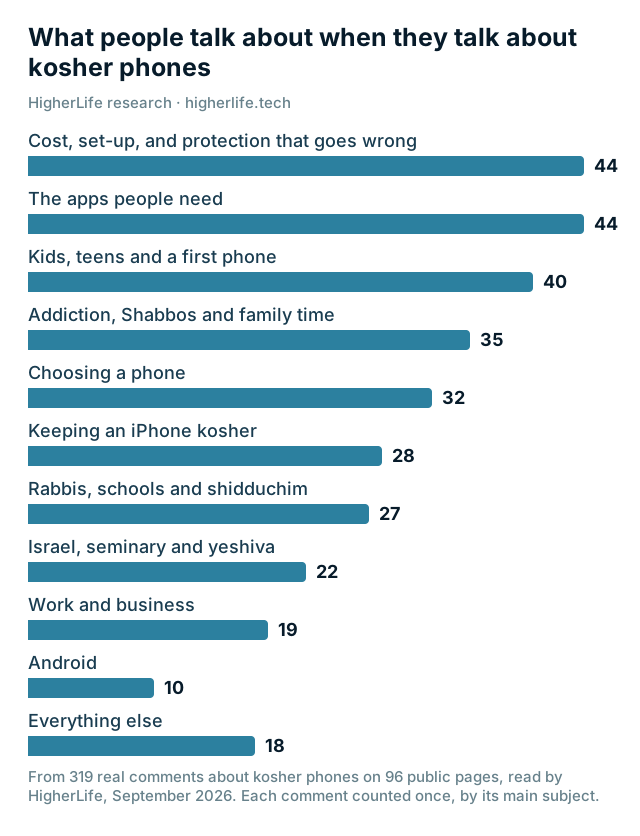
Many families would happily carry a basic phone if life allowed it. For a growing number of people, it does not. When we read 319 questions and comments from 96 forum and news pages, from 2010 to 2026, the same list of needs came back again and again:
- WhatsApp. Family abroad, the school's parent group, the class group, the shul, the shadchan. It was the single most discussed app, in both directions: people who cannot give it up, and people who want it gone.
- Getting around. Waze or Google Maps, Uber or a car service.
- Money and work. Banking apps, the security code the bank texts you, work email, a work calendar.
- The camera. Photos of the children, sent to the grandparents.
- Keeping the phone and the number they already have. Many already own an iPhone and do not want to carry a second phone or lose texts by swapping SIM cards.
At the same time, the same families described what they were afraid of: an open browser, feeds designed to keep you scrolling, pictures that arrive inside perfectly ordinary websites, and the hours that disappear. One woman put it plainly: "Im addicted. I said it."
A kosher iPhone is the attempt to keep the first list and lose the second. Whether that works depends almost entirely on how it is set up, and by whom.
The three ways to make an iPhone kosher
Most approaches fall into one of three kinds. They differ in cost and in effort, but the difference that matters most is simple: who can undo it?
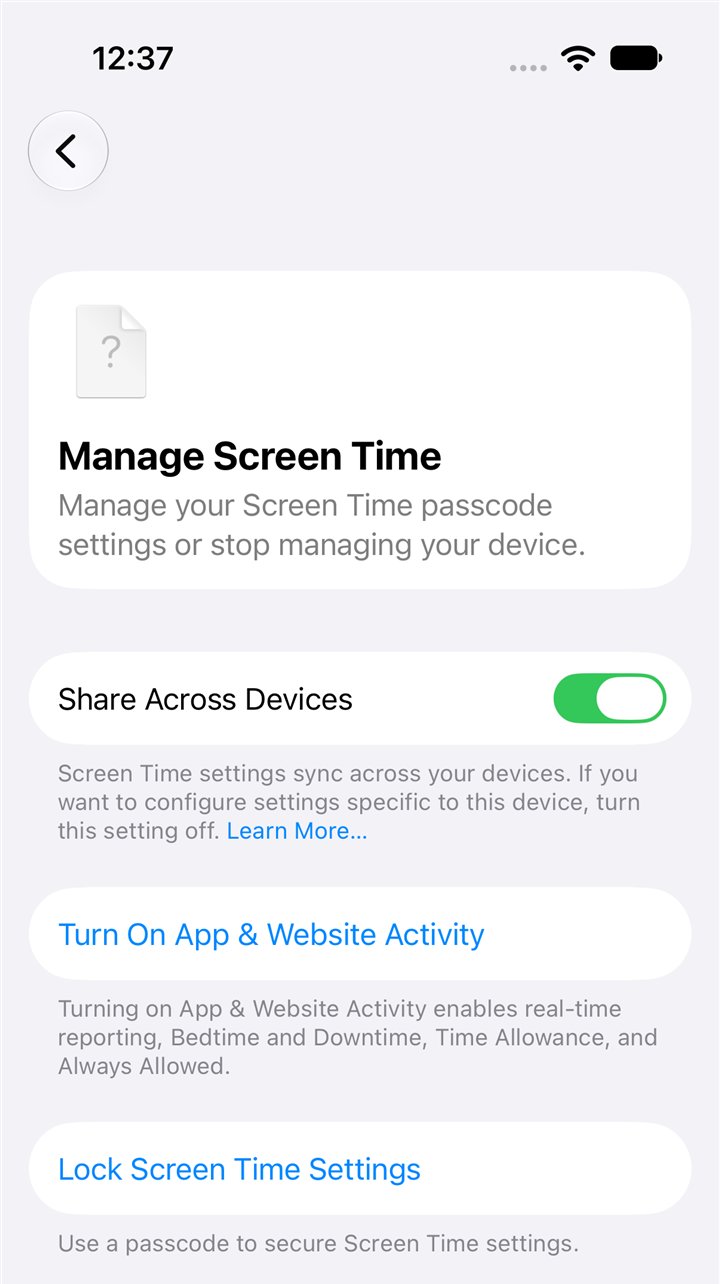
1. Apple's own settings (Screen Time and Family Sharing)
Every iPhone comes with a strong set of parental tools. On a child's iPhone that is part of Apple's Family Sharing, a parent can, from their own phone:
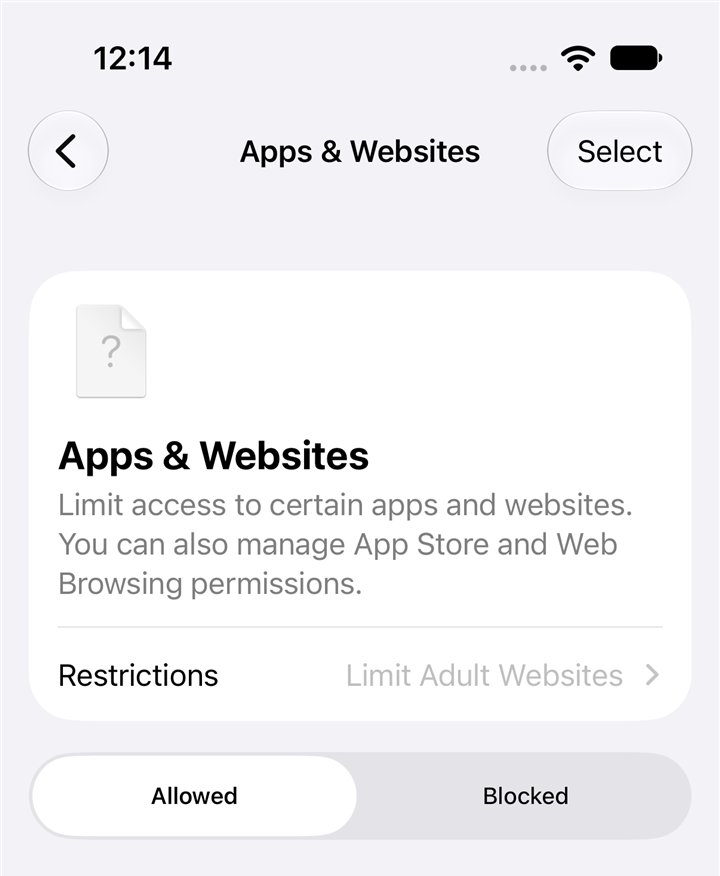
- Limit websites. Apple offers two levels: "Limit Adult Websites", which tries to keep out adult sites, and "Approved Websites Only", where the phone opens only the websites a parent has approved. Apple turns the stricter one on by default for children under 13, and the lighter one for children under 18.
- Approve every download. With "Ask to Buy", a child asks and a parent approves before any app or purchase arrives. Apple turns it on by default for children under 13.
- Block single apps and websites, and limit apps, films, music and books by age rating.
- Choose who the child can talk to: contacts only, or groups that include at least one contact, or everyone.
- Set time allowances and schedules, such as no phone at night.
- Turn on Communication Safety, which warns a child and blurs photos or videos with nudity or violence in Messages, AirDrop, FaceTime and some other apps. Apple turns it on automatically for children under 18. Adults can turn on the same warning for themselves, under the name "Sensitive Content Warning".
These tools are free, built in, and better than most people realize. The newest ones need iOS 27 on every device in the family. For a young child whose parents are careful, they can be enough.
Where they fall short. Apple built them for parents managing children, not for adults who want their own phone held to a standard, and not for a household that wants the standard to hold when nobody is watching. In practice:
- They are settings, not locks. Apple's guide for iOS 26 says it plainly: "By default, Screen Time limits can be ignored once reached." They hold firmly only with a Screen Time passcode, and whoever knows that passcode can change everything. On your own phone, that is usually you, in a weak moment. A passcode you set for yourself is a reminder, not a lock: Apple lets the account owner recover it. Parents ask why their children keep turning Screen Time off. On the community forums the common view is blunt. One woman wrote in January 2026 that parental controls "are extremely easy to bypass". We will not publish how. It is enough to know that many children find out.
- "Limit Adult Websites" is a coarse net. It tries to catch adult sites. Apple does not describe checking the pictures on the sites it lets through, and it does not know your family's standard.
- "Approved Websites Only" is strict but narrow. Every new site you need (a school form, a doctor's portal, a shop) needs a parent's approval first. In iOS 27 a child can ask from the phone and the parent approves from their own, but many families tire of approving and loosen it all at once.
- They cover the browsers Apple names. Apple says its website approvals work "in Safari and other supported browser apps" (iOS 27). It does not promise more than that. Ask any setup exactly what it covers.
2. An app you add
The App Store has many apps that promise to watch, block or report what a phone does. They range from simple blockers to full monitoring that sends a parent reports.
They can add real value, especially reports that help a parent start a conversation. But the same questions apply, and a few more. Who controls the phone and the app's account can usually remove the app. Some apps watch and report rather than prevent. Many read a great deal of private information to do their job, so it is worth reading exactly what they collect and where it goes. And most charge a monthly subscription per child.
3. A phone set up and kept by a service
The third way is to have the iPhone set up by a person, in person, by a company whose whole job is to keep it that way. The protection is set for the person using the phone, and the account holder makes the changes. When the family's needs change (a child grows up, a job needs a new app), the account holder changes the level instead of starting over.
For a child's phone, where a parent holds the account, this is what many families mean by a standard that holds on a good day and a bad day. For an adult's own phone, ask any service plainly who can change the level, and how. The other questions to ask are about the company: who can see what, how fast they answer, what it costs for a year, and what happens if you leave. The checklist below covers all of them.
| Apple's own settings | An app you add | Set up and kept by a service | |
|---|---|---|---|
| Cost | Free | Usually a monthly subscription | A plan, usually paid for the year |
| Who sets it up | You | You | A person, with you there |
| Who can undo it | Anyone with the Screen Time passcode | Whoever controls the phone and the app | Depends on the service. HigherLife publishes its answer: the parent or guardian changes the level from My HigherLife, and removing the protection is done with a HigherLife rep |
| Pictures inside ordinary sites | Apple does not describe checking them. Communication Safety blurs pictures in Messages, AirDrop, FaceTime and a few other places; Safari is not on Apple's list | Depends on the app | Depends on the service. HigherLife's homepage shows its answer: a cover where an unwanted picture would appear, with the everyday page around it still there |
| Which browsers | Safari and other supported browser apps | Depends on the app | Depends on the service: ask for the answer in writing (the 12 questions) |
| Built for | Parents of children in Family Sharing | Parents who want reports | Families who want it set up and looked after by a person |
| When you need a blocked site or app | You change the setting yourself | You change the setting yourself | You ask the account holder or the service |
What a kosher iPhone should keep
The reason to carry an iPhone rather than a basic phone is what it can still do. Before you choose any setup, write down what the person carrying the phone really needs. The forums agree on the core list:
- Calls, texts and iMessage, including group texts, pictures and voice notes, with a real keyboard.
- WhatsApp for family, school and work. Decide in advance how you feel about its extras (Status updates, Channels, and videos forwarded in large groups). Families differ here more than anywhere else.
- Maps and rides: Waze or Google Maps, Uber, Lyft or the local car service.
- Money: the bank's app, and the text message with the security code the bank sends when you sign in.
- The camera and photos, and a backup so the photos are never lost.
- Email, and for many adults a work calendar and one or two work apps.
- Learning and music: shiurim, podcasts, music, a siddur, zmanim.
- The hotspot, if the home's internet runs through the phone: raise it before you choose any setup.
Anything on this list that a setup cannot do is a reason someone in the house will eventually carry a second phone. One businessman in Bnei Brak told the Times of Israel: "From a cellular perspective, I lead a double life." A good kosher iPhone is designed so nobody has to.
What it should keep out, including the doors people forget
Everyone knows the obvious list: explicit sites, gambling, dating. Any serious setup keeps those out. The difference between a setup that works and one that only looks like it works is in the less obvious places:
- Pictures inside ordinary websites. A news site, a shop or a recipe page can carry pictures a family would never choose. Blocking whole sites does not reach them.
- Search results. Image results and suggested searches are their own world.
- Feeds and short videos. The part of the phone designed to keep you scrolling. For many adults this, not explicit content, is the real problem.
- The App Store. If anything can be installed, anything can arrive.
- Time. A phone can be perfectly clean and still take the evening. That part is about habits as much as settings, and we cover it in our guide to phone addiction.
The kosher iPhone checklist
Before you choose any way of making an iPhone kosher, ask these questions. They work for Apple's settings, for any app and for any company, including us. A good answer is short and specific. A vague answer is an answer too.
| # | The question | Why it matters |
|---|---|---|
| 1 | Who can undo it, and how? | If the person carrying the phone can switch it off in a weak moment, it will be switched off in a weak moment. |
| 2 | Does it keep the phone and the number I already have? | Buying a second device and swapping SIM cards is where texts get lost and double lives begin. |
| 3 | Which of my apps stay, exactly? | Go through your own list (WhatsApp, maps, bank, email, camera) one by one. "Most apps" is not an answer. |
| 4 | What happens to pictures inside ordinary websites? | This is where "blocking bad sites" stops being enough. |
| 5 | What exactly does it cover, beyond the main browser? | A clear answer tells you what you are paying for. |
| 6 | When I need something that is blocked, who decides and how do I ask? | A setup that blocks a school form or a work tool without a clear way to ask gets removed. |
| 7 | Can the level change as the person grows, without starting over? | A first phone at 11 and a phone at 17 are different phones. |
| 8 | What can the company see? | Ask it in writing. You want a plain list of what they keep and what they never see. |
| 9 | If I leave, what happens to my apps, photos and chats? | Nothing that was yours should be taken with them. |
| 10 | What does it cost for a whole year, per phone, and for the whole family? | Device, setup, monthly fees and add-ons, added up. |
| 11 | Is there a person to call? | Something will come up. A phone number that answers matters more than a feature list. |
| 12 | Will my school, yeshiva or seminary accept it? | For many families this decides everything. Ask the institution directly, before you buy. |
Question 12 deserves a word of its own. Schools, yeshivos and seminaries set their own phone rules, and they differ. Some require a specific kind of device or approval. None of that is ours, or anyone's, to promise on a website. Take this checklist to the school, ask what they accept, and choose with their answer in hand.
Which setting fits which person
There is no single right level. There is a right level for the person holding the phone today. These are the patterns families describe most often.
| Who | What usually fits | What to watch |
|---|---|---|
| A child's first phone (10 to 13) | Calls, texts and a few chosen apps. No open browsing. | Group chats. Decide about WhatsApp before the first class group invites them. |
| A teenager | More apps, still no open browsing, with a clear way to ask for more. | A secret second phone. A setup so strict it feels like punishment invites one. |
| A bochur or a seminary girl | Whatever the yeshiva or seminary requires. | Ask them first. Rules for a year in Israel can be stricter. |
| A working adult | Work apps, email and the sites the job needs, with feeds and open browsing kept out. | Work apps and bank codes. Test them on day one. |
| An adult who wants a quiet phone | Calls, texts and the few apps they use every day. | Make the list before you choose, and test the bank app on day one. |
What no phone can do for you
A kosher iPhone is a strong tool. It is not a substitute for a home.
- It cannot make someone want it. A teenager who feels controlled will look for a way out. The families who describe success talk about deciding together, explaining why, and loosening step by step as trust grows.
- It cannot fix the habit by itself. "I know ppl who are addicted to their KOSHER phones as well," one woman wrote. Taking out the worst of the internet helps. Phones away at the dinner table helps more.
- It cannot answer halachic questions. Ask your rav what your home should keep and what it should keep out. Then set the phone to match.
- It cannot be perfect. Be wary of anyone who promises that. Ask instead what happens when something slips through: who you call, and how fast it is fixed.
Questions people ask
Is an iPhone kosher?
That is a question for your rav. Communities differ: some require a basic phone, and some allow a smartphone only with approved protection, for example for business (Kiryas Joel's 2015 rules, as JTA reported). Ask your rav and your school what they accept.
Can I make my iPhone kosher myself?
Yes, with Apple's Screen Time and Family settings, and it is worth doing well. The weakness is the passcode: whoever knows it can change everything, and on your own phone that is usually you. If you go this way, let someone else keep the passcode.
Is Screen Time enough?
For a young child with attentive parents, it can be. For a teenager, or for an adult who wants the standard to hold on a hard day, most families find it is not, because it can be changed by whoever knows the passcode and it does not look at pictures inside ordinary sites.
Can a kosher iPhone have WhatsApp?
It can, and for many families it must. Decide in advance how you feel about WhatsApp's extras, such as Status updates, Channels and forwarded videos, because families differ most here. Our app-by-app guide covers WhatsApp in detail.
Do I need to buy a new phone?
Not if you already have an iPhone. A kosher iPhone is the iPhone you already have, set up differently. Your number stays with your carrier. See how to make the iPhone you already own kosher.
Does a kosher iPhone still get Apple's updates?
It should. Apple's updates carry security fixes, and a phone that cannot be updated becomes less safe over time. Ask any service you consider how updates are handled.
Can my child get around it?
With settings on the phone alone, many children do, which is why parents ask this so often. Ask any service who can change the setup, and what happens if something slips through. No honest company will promise perfection.
How much does a kosher iPhone cost?
Apple's own settings are free. Apps usually charge a monthly subscription. Services charge a plan, often yearly. Add up a whole year per phone, including any device you would have to buy. Keeping the iPhone you already own is usually the cheapest way.
Is a kosher iPhone better than a kosher flip phone?
It depends on the person. A flip phone is simpler and harder to misuse, and some schools require one. A kosher iPhone keeps WhatsApp, maps, the bank and the camera. Our guide to every kind of kosher phone sets them side by side.
Sources
- Apple, Set up parental controls to manage your child's iPhone or iPad (iOS 27): website levels, Ask to Buy, allowed contacts, time allowances, and their defaults by age.
- Apple, Block or allow access to apps and websites on your child's device: "Limit Adult Websites" and "Approved Websites Only", and their defaults.
- Apple, Set schedules with Screen Time (iPhone User Guide, iOS 26): "By default, Screen Time limits can be ignored once reached."
- Apple, Create, change, or remove a Screen Time passcode (iPhone User Guide, iOS 27): resetting a self-set passcode with your own Apple Account.
- Apple, About Communication Safety on your child's Apple device: what it blurs, where it works, on by default under 18, and Sensitive Content Warning for adults.
- Times of Israel, Kosher cellphone bill sparks debate on Haredi consumer freedoms vs. communal coercion (July 23, 2024): "a double life".
- Imamother forum, a thread comparing iPhone parental controls with paid services (January 2026) and Inspire me with your kosher phone (April 2023).
- JTA, Hasidic village makes parents choose (August 5, 2015).
- HigherLife research: 319 questions and comments from 96 community forum and news pages, 2010 to 2026, read in September 2026.