Is There a Kosher WhatsApp Alternative? Meet Aneni
Yes. Aneni is a free messenger built for the Jewish world: the chats, groups, voice messages and free video calls a family uses every day, without the strangers' feeds, the ads and the open Status that make WhatsApp a worry. Every photo is checked before it is shown, men's and women's spaces are kept apart, and your sefarim are one tap from your chats. It is on the App Store, Google Play and in any browser.
Why families go looking for a WhatsApp alternative
Ask a frum family what they cannot give up on a phone and WhatsApp comes first, almost every time. The class group, the shul announcements, the cousins in Israel, the carpool, the simcha pictures: they all live there. Pew Research Center's 2025 count puts WhatsApp at 32% of all US adults, up from 22% in 2018, and in a community with family on three continents the real share is plainly higher.
The same families say, in the same breath, what they wish were not there. On the Imamother forum a mother writes, "the one thing I'm having a hard time giving up is whatsapp"; another, "I need whatsapp (I have a lot of international family and it's the only way to communicate)"; a third, "I absolutely do not want whatsapp, because that is one of the biggest problems for me!" One line from a 2024 thread sums up the knot: "I think kosher phone w WhatsApp is an oxymoron."
So the search begins: kosher WhatsApp alternative, messenger without Status, a chat app for Jewish families. Until now the honest answer was a compromise. You could keep WhatsApp and turn pieces of it off, as our Kosher WhatsApp guide explains, or you could leave the groups behind. This guide is about the third answer, which did not exist a few months ago: a messenger made for this community from the first line, with the everyday features intact and the rest never built in.
What WhatsApp became, and what a family pays for it
WhatsApp started as a replacement for text messages. It is no longer that. By its own announcements it added Communities in November 2022 and took Channels to more than 150 countries in September 2023, and today the Updates tab is a feed: a stranger's channel, a celebrity's channel, a news channel, each a tap away from the family chat. WhatsApp's own terms set the floor at thirteen years old, which tells you who the app was designed for.
For a Torah home the cost is not one big thing. It is a hundred small ones.
- Status. A contact you barely know posts a picture, and it is on your phone before you decided anything. In a mixed contact list, men see women's pictures and women see men's, with no setting that keeps them apart.
- Channels and the Updates tab. A feed of accounts you never asked for, with its own suggestions of more.
- Pictures from anyone. A forward in a 200-person group arrives as it was sent. Nothing stands between the picture and the screen.
- The pressure of the ticks. A 2016 Yeshiva World thread put it well: the app "shows when the receiver reads the message. So you feel pressure to reply immediately, even during davening, learning or family time."
- Two identities. The whole account hangs on your cell number, so the number you give a shadchan, a customer and a group of strangers is the same one.
Some of this can be trimmed with settings, and we wrote a whole guide on which ones. But a setting is a fence around a field that is still there. Aneni's answer is a different field.
Meet Aneni: a messenger for the Jewish world
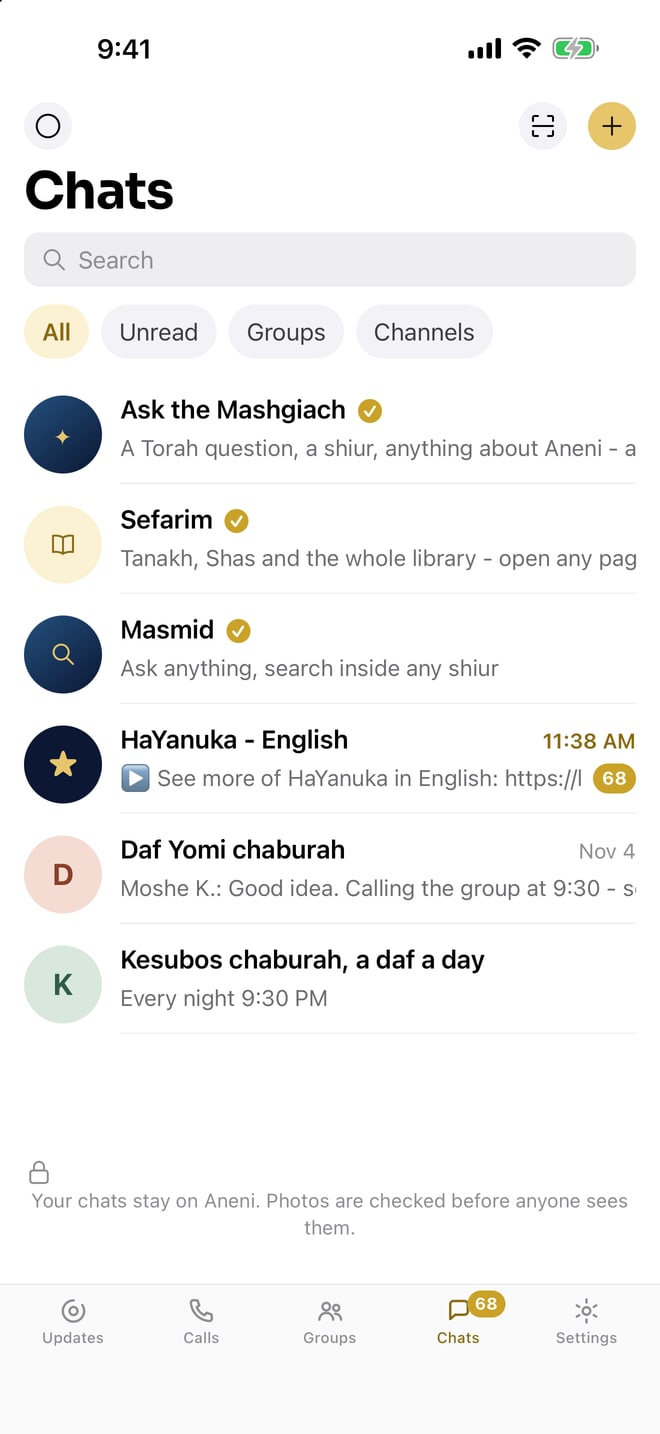
Aneni (ענני, "answer me") is a free messenger from LeHallel, the Torah and music library that HigherLife puts first on every phone it sets up. LeHallel's own words for it are the ones we would have chosen: "Everything you love about WhatsApp. None of what you don't." It opened on the App Store and Google Play in November 2026, and it runs in any browser too, so a family can start on whatever it already owns.
What makes it a messenger for the Jewish world is not a sticker pack. It is four decisions made before the first screen was drawn:
- Every photo is checked before it is shown. In a chat, in a group, in a Status. Not a setting you turn on; the way the app works.
- Men's and women's spaces are kept apart. Status and the people you can find are your own side's. A mixed family group still works as a group; the open feeds do not cross.
- No ads, no strangers' feeds. There is nothing in the app that was put there to hold your attention. Your chats are yours.
- Torah one tap away. The whole sefarim library and Masmid, LeHallel's learning companion, pinned at the top of your chats if you want them there.
Everything else is what you would expect from a modern messenger, and it is already there.
Everything you use every day, already there
Moving a family to a new app only works if nobody has to give anything up. Aneni's everyday list is WhatsApp's everyday list:
- Chats and groups. One list, newest on top, unread at a glance. A group for the family, one for the Daf Yomi chaburah, one for the class parents.
- Read ticks and typing. One tick, sent. Two ticks, arrived. Two blue ticks, read. And you see when someone is typing back.
- Replies and reactions. Press a message to answer exactly that one, or to add a thumbs up, a heart or a thank you.
- Voice messages. Hold the gold microphone, say it, send it.
- Photos. Press the camera. The picture goes through its check and then to the chat.
- Channels. A channel for the Yanuka's daily words in English, for a shul, for a school, run by the people you know, with no feed of strangers around it.
- It rings like a phone. Calls and messages reach you when the app is closed, the way a phone call does.
The thumbs already know where everything is. That is the point: the first evening on Aneni should feel like the five-hundredth evening on the app it replaces, minus the parts you were quietly managing.
Free video and voice calls, one on one or the whole group
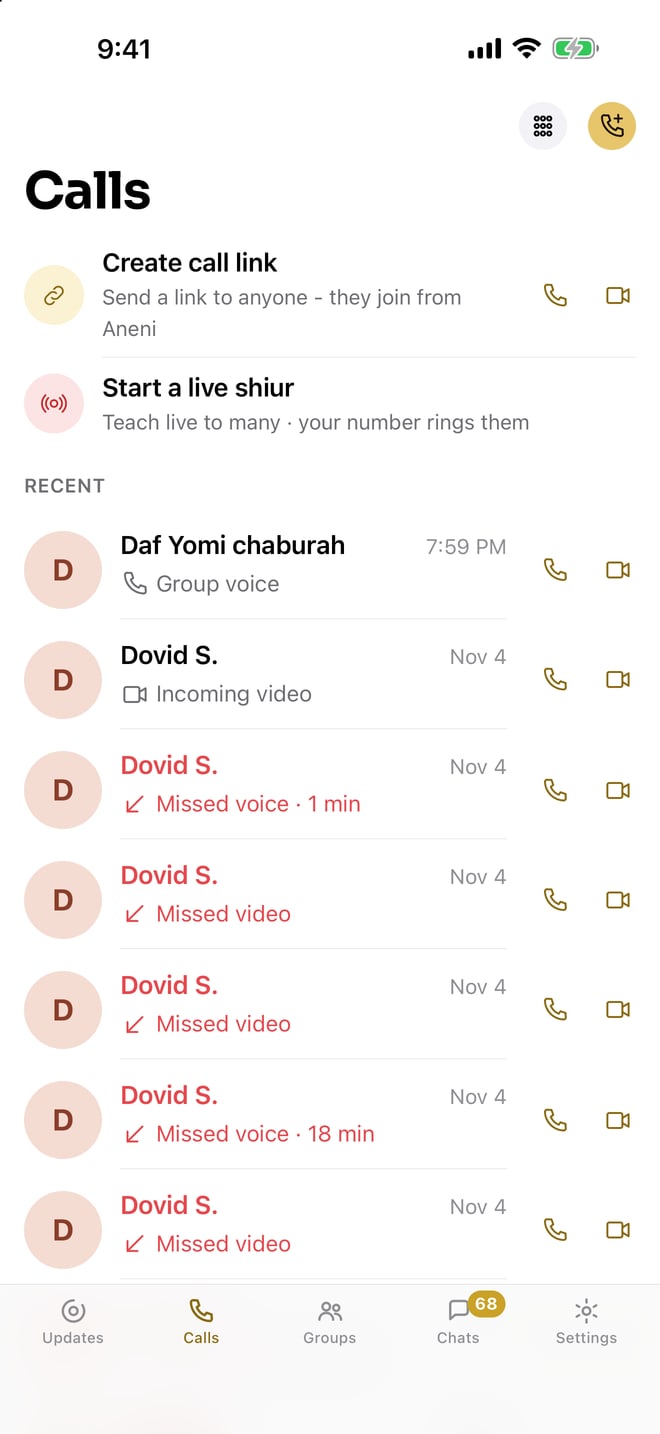
Every call on Aneni is free, to anyone on Aneni, anywhere in the world. A grandmother in Yerushalayim, a son in yeshiva in Lakewood, a sister in Manchester: one press, no minutes, no cost. Every call can be a voice call or a video call, your choice when you place it, and every group has its own call, so the whole chaburah or the whole family can be together with one press.
Two honest notes. Calls work between people who both have Aneni; it does not dial an ordinary phone line. And like any video call it needs the camera and microphone allowed once on the phone. Aneni's Settings has a "Test my camera and microphone" button for the first time, which is a small thing that saves a lot of "can you hear me?"
Your own free Aneni number, or keep your cell
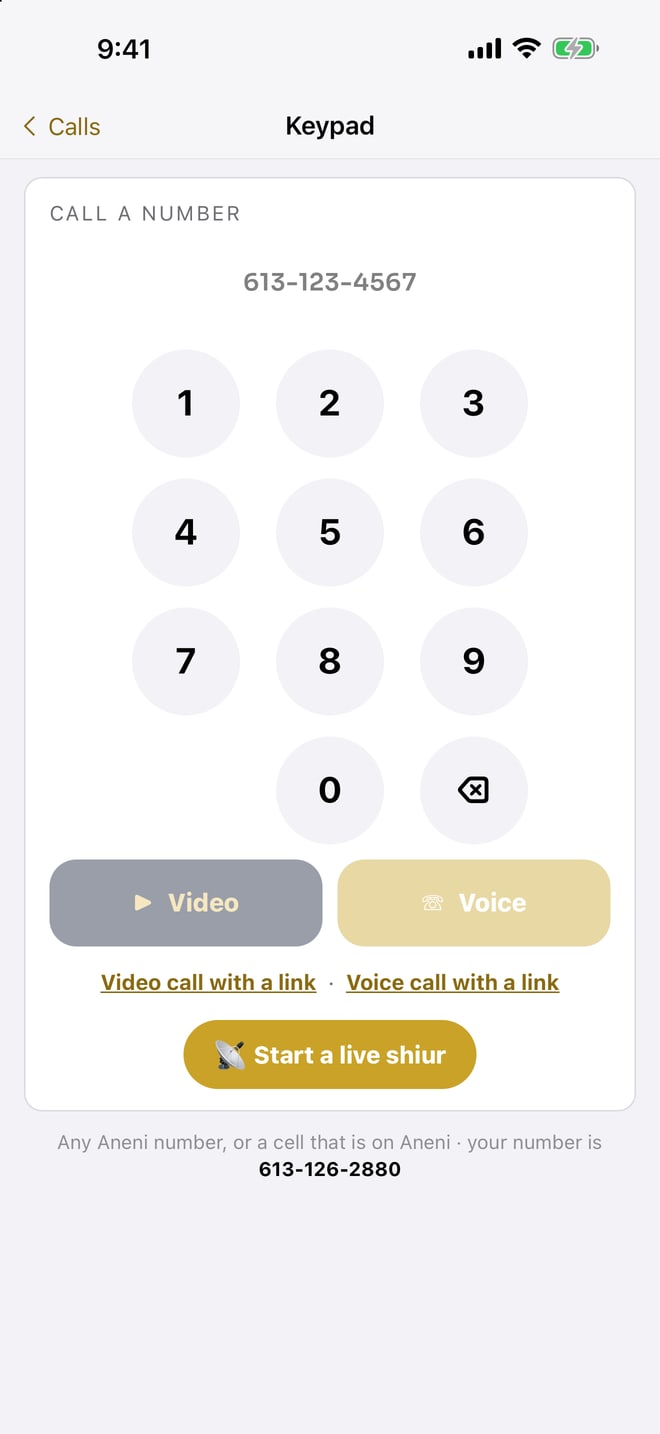
This is the feature families did not know they wanted. When you turn Aneni on you get a free Aneni number of your own, ten digits, and you can choose it. Or you keep the cell number you have had for twenty years, so friends find you the way they always did. Both work the same.
Why does it matter? Because a number is an identity. A teacher can give the class parents an Aneni number that is not her personal cell. A business owner can keep customers on one number and family on another. A bochur with no smartphone line can still have a number his family reaches, on a tablet or a computer. And if a number is ever given to the wrong person, it is a number, not your life.
A kosher Status and channels: only your side sees it
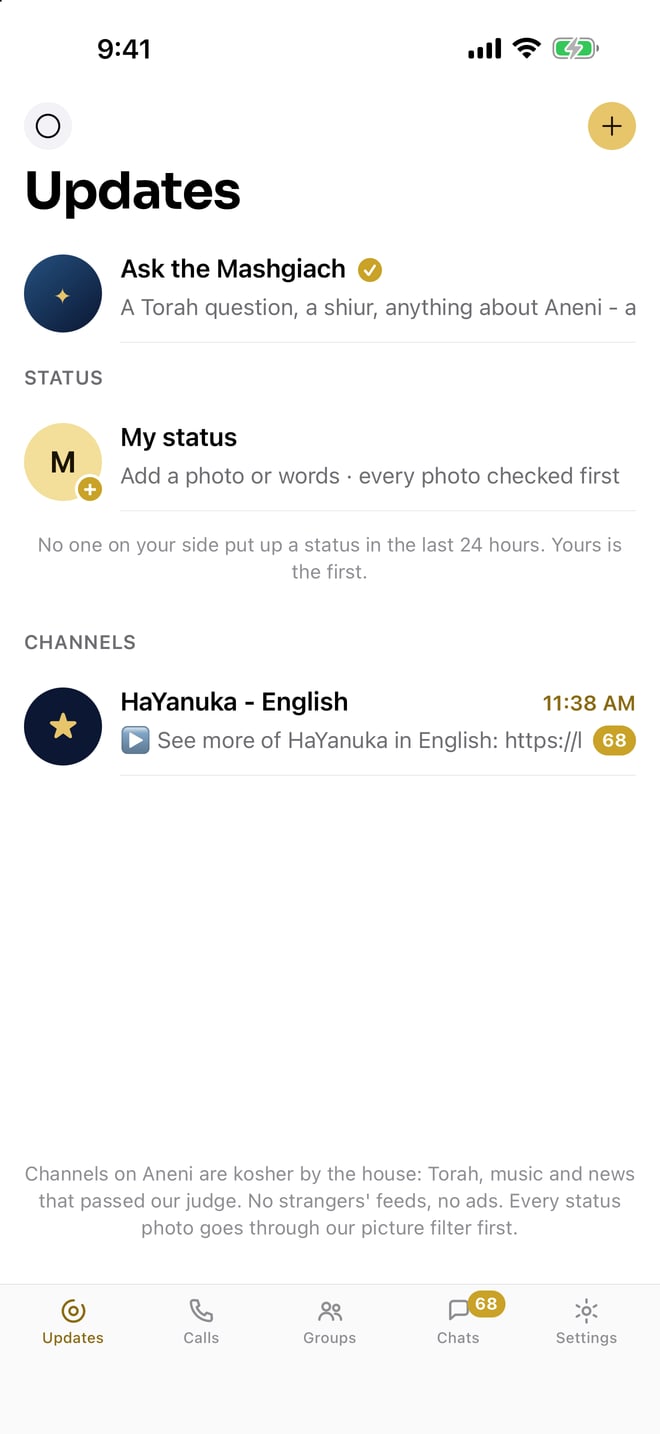
Aneni did not throw Status away. Families like it: the simcha pictures, the "we landed safely," the kids' first day of school. It changed who sees it. Your Status is seen by your own side, men by men and women by women, and every photo in it has gone through the same check as a photo in a chat. There is no tab of strangers' stories next to it, and nothing suggests more.
Channels follow the same rule. A channel in Aneni is something you joined on purpose: the Yanuka's daily words in English, your shul, your children's school, a chesed organization. It is not a shelf of channels you never asked for.
Every photo checked before it is shown
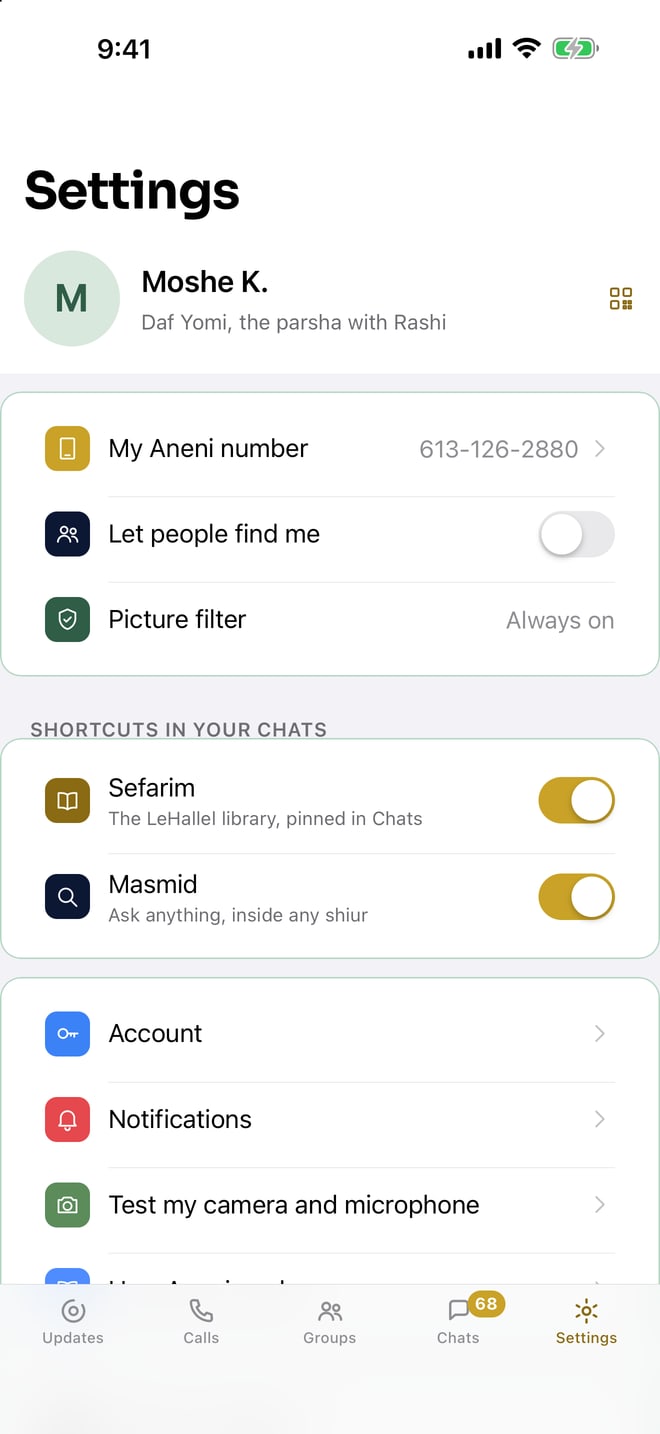
Here is the one thing no setting in any other messenger gives a family. In Aneni, a photo is checked before it reaches the screen. Every photo, from everyone, in every chat, group and Status. The sender does not choose it, the receiver cannot turn it off, and there is no "view anyway." The setting that shows it in the app is there so you can see that it is on, not so you can switch it off.
Think about what that means for a 200-person community group. Today, the group is only as careful as its least careful member, and one forward reaches every phone as it was sent. In Aneni the group can be as big as it likes.
It also changes the conversation with a teenager. The rule is no longer "I trust you not to open it." The rule is the app's.
Sefarim and Masmid, one tap from your chats
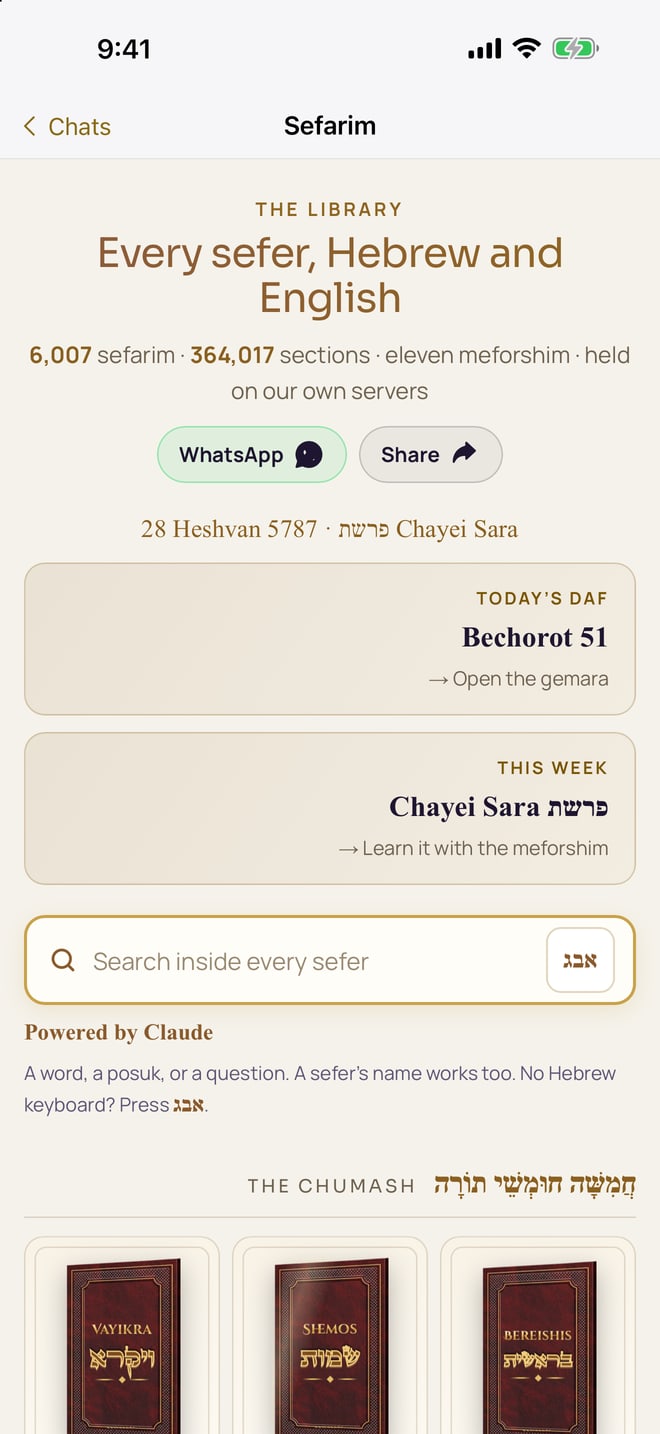
This is the part that makes Aneni feel like it was made here. In Settings, under "Shortcuts in your chats," two switches are on from the start: Sefarim and Masmid. With them on, both sit pinned at the top of your Chats. One tap opens LeHallel's whole library, Tanach, Mishnah, Shas, halacha and more, inside Aneni, edge to edge; "Chats" brings you straight back. The other opens Masmid, LeHallel's learning companion, which answers a question about a sugya or finds the source you half remember.
In practice it means the chaburah chat and the Gemara are the same app. "Which Tosfos did you mean?" is answered without leaving the conversation. For a learning group that meets on an Aneni call, the sefer is already open.
Report, block, delete: the controls every messenger owes you
A messenger for families has to be safe to leave in a child's hand and honest with an adult's. Aneni carries the controls that make that true:
- Report and Block on every person, message and group. A stranger who finds a number is one press from gone.
- Delete my account, inside the app, in Settings. No letter, no waiting.
- Help in Settings, and a support page that promises what we have seen it keep: every message answered.
- Your own side only for the people you can find and the Status you see, so the app never introduces a stranger to a child.
None of these is a reason to skip the conversation at home about who a child talks to. They are the reason the conversation can be about people, not about the app.
WhatsApp and Aneni, side by side
The table below is the one families asked us for: the same list of everyday features, and what each app does with it today. "Setting" means the feature can be trimmed by a person who knows where to look; "built in" means it works that way for everyone, with nothing to find.
| What a family asks about | Aneni | |
|---|---|---|
| Chats, groups, read ticks, typing, replies, reactions | Yes | Yes |
| Voice messages | Yes | Yes |
| Free voice and video calls, group calls | Yes | Yes, to anyone on Aneni |
| Status | Open to your contacts; trimmed by a setting | Built in: your own side only, every photo checked |
| Channels | A tab of channels and suggestions; trimmed by a setting | Only the channels you join |
| Pictures from anyone in a group | Arrive as sent | Checked before they are shown, always |
| Men's and women's spaces | No such setting | Built in |
| Ads and attention feeds | In the Updates tab | None |
| Your number | Your cell number | A free Aneni number you choose, or your cell |
| Sefarim and a learning companion inside | No | Yes: Sefarim and Masmid pinned in your chats |
| Report, block, delete my account | Yes | Yes |
| Age the app is designed for | Thirteen and up, by its terms | The whole family |
| Price | Free | Free |
| Where it runs | iPhone, Android, computer | iPhone, Android, any browser |
How a family, a class or a shul moves over in one evening
A messenger is only as useful as the people on it, so the move is a group project. Here is the order that works, from families who have done it:
- Start with one group that already wants it. The family chat, or a chaburah. Everyone in it installs Aneni from the App Store or Google Play (or opens it in a browser), turns it on with a free Aneni number or their own cell, and the group is made again in Aneni in two minutes.
- Keep the old group open for a week. Post the Aneni invite in it, pin it, and let the stragglers arrive. Nobody is cut off on day one.
- Move the groups that carry pictures first. The simcha group, the class group, the community group. These are the ones where the picture check matters most, and where the relief is felt first.
- Give the shul or school its own channel. Announcements go out once, to the people who joined, with nothing around them.
- Set the shortcuts. In Settings, under "Shortcuts in your chats," Sefarim and Masmid are on from the start. Leave them on for the learners; turn them off for a child's account if you prefer a plain messenger.
- Decide about WhatsApp afterward, not before. Some families keep it for the one group that will not move and trim it with the settings in our guide. Some delete it. The move does not depend on that decision.
The whole thing takes an evening because nothing has to be learned. The buttons are where everyone's thumbs expect them.
Aneni on iPhone, Android and the computer
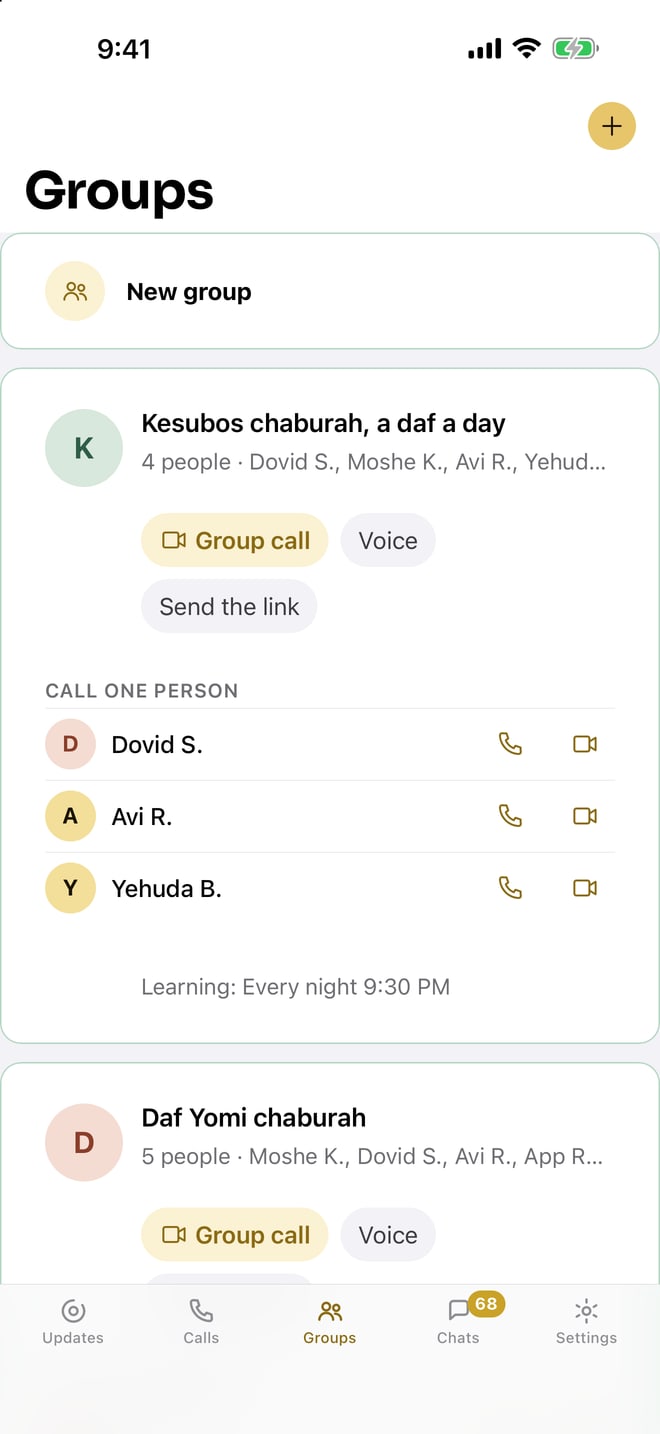
Aneni is the same app everywhere. On an iPhone it comes from the App Store; on an Android phone from Google Play; on a computer, or any phone with a browser, it opens at aneni.app with nothing to install. One account follows you across all of them, and an update to the app reaches every phone at once, because the app itself lives with LeHallel and not in a hundred copies.
For families who keep a simple phone for the children and a computer at home, that last part matters: a child can have an Aneni number and the family groups on the home computer, with every picture checked, and no smartphone in the picture at all.
What Aneni does not do
We would rather you heard it from us. Aneni does not send ordinary text messages to people who are not on Aneni; it is a messenger, like WhatsApp, and both sides need the app. Its calls connect people on Aneni and do not dial a phone line. A chat is between the people in it; there is no public directory of strangers to browse, which is a feature, but it means you invite the people you want. And it is new: it opened on the stores this month, and the groups you want are the ones your own community moves over.
What it does, it does for everyone, with nothing to find in a menu. That is the whole difference between a setting and a decision made before the app was built.
Questions people ask
Is there a kosher alternative to WhatsApp?
Yes. Aneni is a free messenger built for the Jewish world: chats, groups, voice messages and free video calls, with every photo checked before it is shown, men's and women's spaces kept apart, no ads and no feeds of strangers. It is on the App Store, Google Play and in any browser.
Is Aneni free?
Yes. The app, the Aneni number and every call are free.
Can I keep my own phone number on Aneni?
Yes. When you turn Aneni on you can keep the cell number you have, or take a free ten-digit Aneni number of your own and choose it.
Does Aneni have Status?
Yes, a kosher one. Your Status is seen by your own side only, men by men and women by women, and every photo in it is checked first. There is no feed of strangers next to it.
Are pictures checked in Aneni?
Every photo, in every chat, group and Status, is checked before it is shown. The sender does not choose it and the receiver cannot turn it off.
Can I make video calls on Aneni?
Yes. Every call can be voice or video, one on one or the whole group, free, to anyone on Aneni anywhere in the world. Both sides need the app.
Does Aneni work on a computer?
Yes. Open aneni.app in any browser and sign in; the same account follows you between the phone and the computer.
Is a messenger like Aneni enough for a Torah home?
Families and communities answer this differently, and it depends on the home and the children. Aneni takes away the parts of a messenger that worry most families; who a child talks to is still a conversation at home. For the halachic questions, ask your rav.
Sources
- Aneni, aneni.app: features, "Everything you love about WhatsApp. None of what you don't.", the free Aneni number, men's and women's spaces, every photo checked, no ads.
- Aneni, Support: calls work between people who both have Aneni; camera and microphone; the ticks; Help in Settings.
- Apple App Store, Aneni: Kosher Messenger; Google Play, Aneni.
- Pew Research Center, Social Media Fact Sheet (2025): 32% of US adults use WhatsApp, 22% in 2018.
- Pew Research Center, Teens, Social Media and AI Chatbots 2025: 24% of US teens use WhatsApp.
- WhatsApp Blog, WhatsApp Channels are going global (September 13, 2023): more than 150 countries.
- WhatsApp Blog, Communities now available (November 3, 2022).
- WhatsApp, Terms of Service: "You must be at least 13 years old to register for and use our Services on your own."
- Imamother forum, a 2022 thread about kosher phones with WhatsApp, Kosher phone with WhatsApp? (2023-2024), Kosher phone with whatsapp (2025).
- The Yeshiva World, What's Wrong with WhatsApp? (2016).