Kosher Android Phones: The Complete Guide
A kosher Android is an Android phone limited to what a Torah home wants it to reach. There are three ways to get one: buy a phone sold already locked down, add protection to the Android you own, or use Google's own Family Link and Digital Wellbeing. Before you choose, ask five things: does it need a fresh, erased phone; who can undo it; which apps stay; will it slow the phone; and what does a whole year cost.
Android or iPhone for a kosher phone?
Many of the "kosher smartphones" sold in American stores are Android phones. There is a reason: Android comes in hundreds of models at every price, and its makers let companies change far more of how the phone works. That openness is exactly why so many kosher Android systems exist, and why they vary so much in quality.
The same openness cuts the other way. A community member wrote as far back as 2013: "Android is very hard to properly kasher, iPhone on the surface is much easier," though he went on to warn that any smartphone brings bigger questions. Today both can be done well, and both can be done badly. The honest comparison is not the logo on the back. It is the answers to the questions in this guide.
| Android | iPhone | |
|---|---|---|
| Choice of devices and prices | Very wide | One maker, fewer models |
| Phones sold already locked down | Many | Few |
| Built-in parental tools | Google Family Link and Digital Wellbeing | Apple Screen Time and Family Sharing |
| Can the other family's tool manage it? | Apple's tools do not manage Android | Google says Family Link cannot manage iPhones |
| Keep the phone you own? | Depends on the protection; some need a fresh phone | Depends on the protection |
| Software updates | Depend on the maker and the model | From Apple directly, for each supported model |
The three ways to make an Android kosher
1. A phone sold already locked down
Our guide to every kind of kosher phone sets these side by side. Several companies sell Android phones with their own restricted systems, usually with a short list of approved apps. The advantage is simplicity: the phone arrives ready. The trade-offs are a new device to buy, a system chosen by the seller, and sometimes limited choice about which apps you keep. Ask exactly which apps are available, how updates work, and what the company can see. And be careful where you buy. One woman looking for a particular kosher phone wrote: "Seems like it's only available on AliExpress or Ebay. Not sure that I should trust that." A kosher phone from a seller who does not answer the phone is a risk, not a saving.
2. Protection added to the Android you own
The second road keeps the phone you already have and adds protection to it, through an app you install or a service that sets it up with you. Done well, you keep your phone, your number and your photos. The questions are about how deep the protection goes, whether it can be undone by the person carrying the phone, and whether it works well on your particular model.
3. Google's own tools
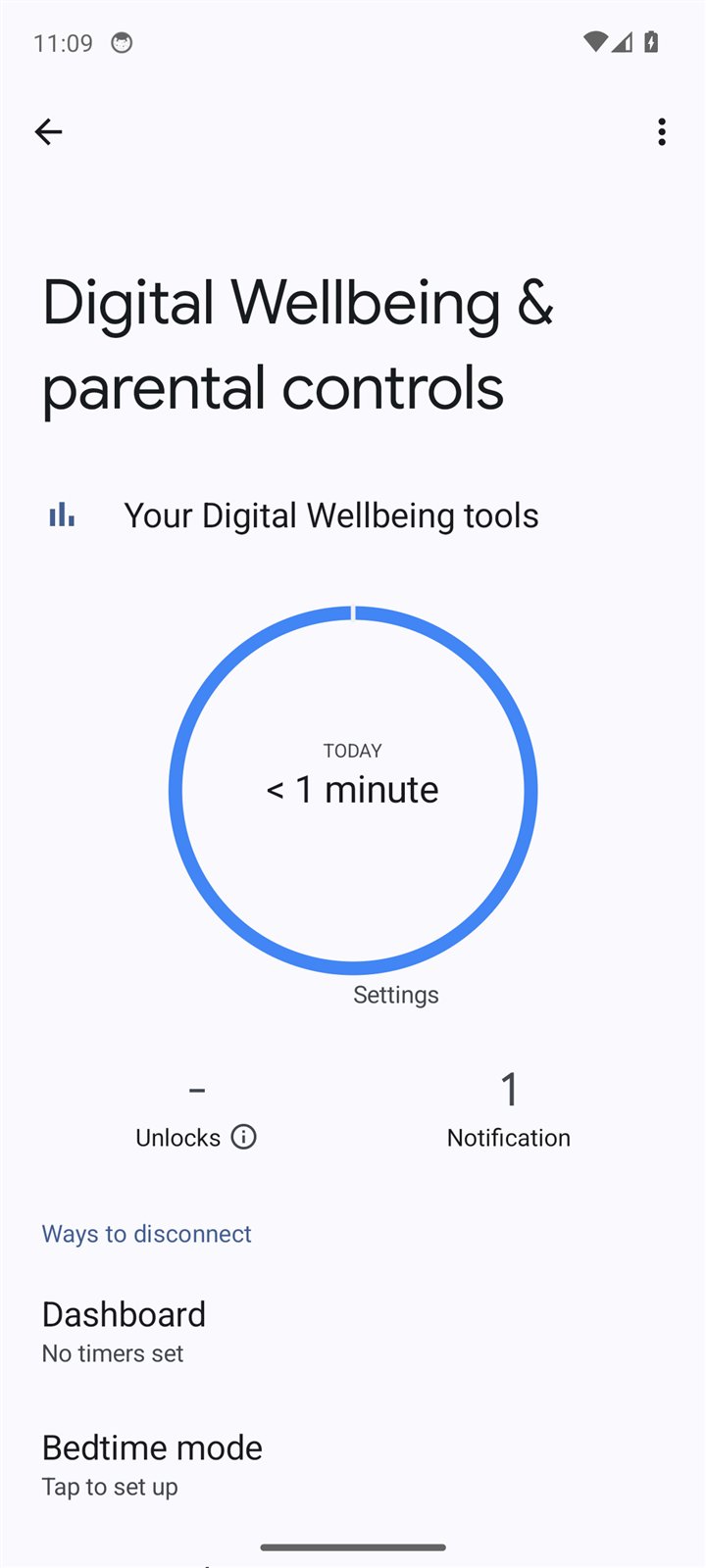
Google's Family Link and Android's Digital Wellbeing are free and built in. For a young child with an attentive parent, they can be a strong start. The section below explains exactly what they do, in Google's own words.
A fresh phone or the phone you own?
This is the question that decides the most, and many families do not know to ask it. Some kinds of Android protection can only be put on a phone that starts fresh, meaning erased and set up from the beginning. Others can go on a phone that is already in use.
- If a phone must be erased, everything on it has to be backed up first and restored afterward. Ask exactly what comes back and what does not.
- If it goes on a phone in use, ask how deep it goes and who can undo it. Protection that is easy to put on is sometimes easy to take off.
- Either way, back up the phone and your WhatsApp chats before anyone touches it.
Ask this before you book an appointment or buy an app. It decides whether you lose an afternoon or your photos.
What Google's own tools do
From Google's own help pages:
- Accounts for children. Family Link lets a parent "create a Google Account for your child under 13 (or the applicable age in your country)," or add parental controls to a child's existing account.
- Apps. A parent can "decide which apps your child can download or purchase, block or allow apps, and change app permissions."
- Time. Daily limits and a bedtime, set per device: two hours means two hours on each Android device or Chromebook. Digital Wellbeing's app timers work on the phone itself: "When you run out of time, the app closes and its icon dims." Google offers a PIN so only someone who knows it can change those limits.
- The browser. Chrome has a setting to hide explicit sites. Google is candid that no such setting is perfect, "but this should help hide sexually explicit sites." Google says it applies "in Chrome and in some Android apps," which is why it makes sense to block browser apps you have not checked too.
- Purchases. "Family Link's purchase approval settings only apply to purchases made through Google Play's billing system."
- Turning 13. Google now says children need a parent's approval to leave a parent's controls until they turn 18. Older articles saying a 13-year-old can switch it off alone are out of date.
- Not for iPhones. Google says Family Link cannot manage iPhones, iPads, or computers other than Chromebooks.
Our guide to parental controls walks through Family Link and Apple's Screen Time side by side, step by step.
We tested it
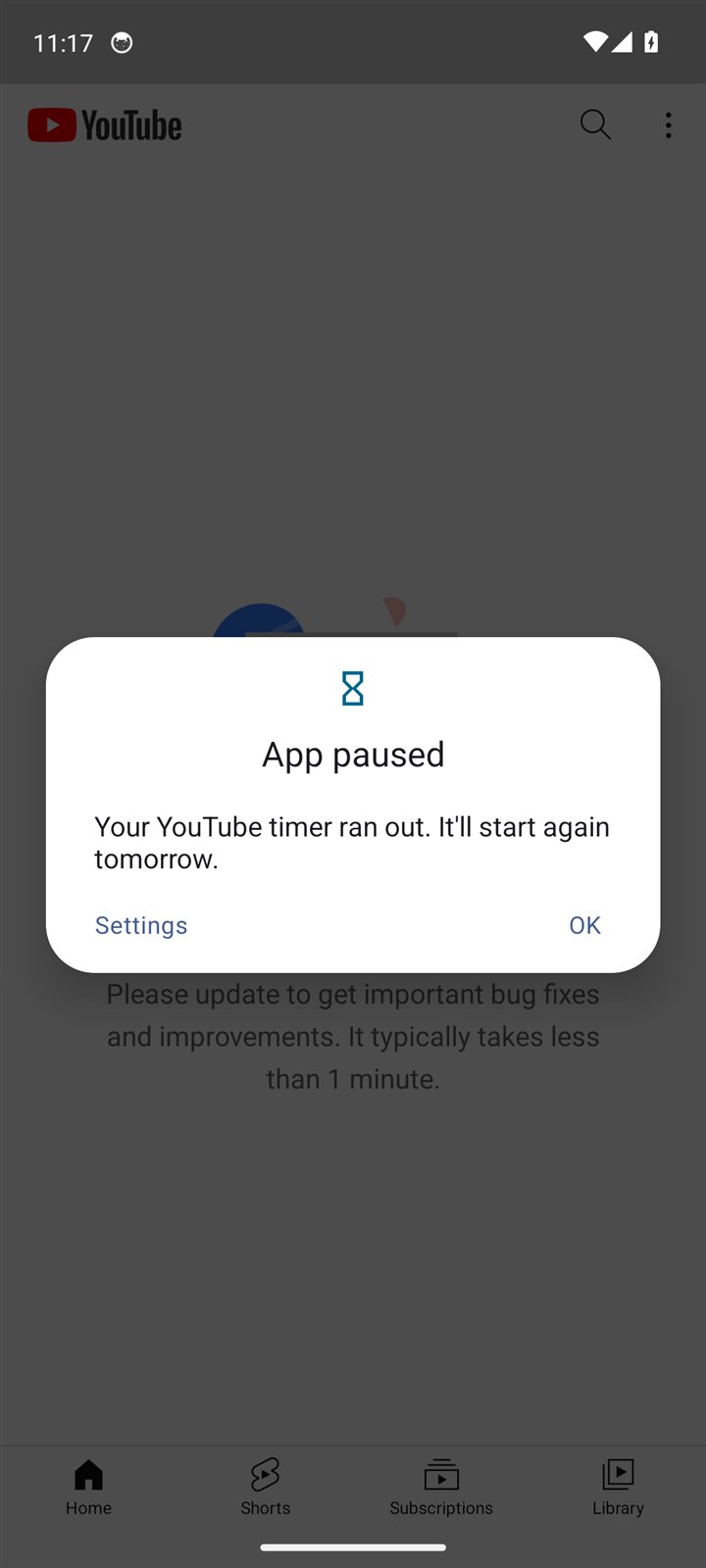
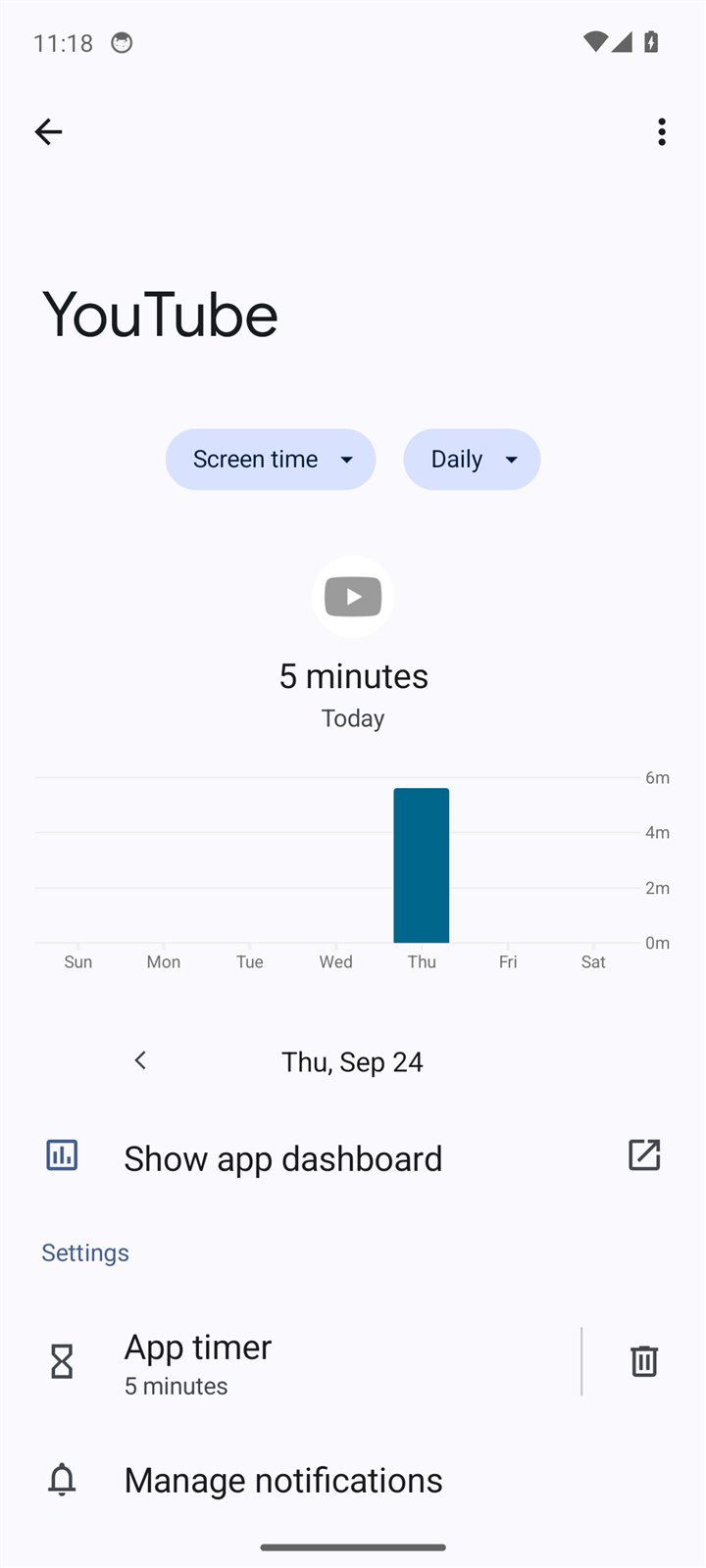
On HigherLife's Android test phone (Google's Android 14, running on a computer) we set a 5-minute daily timer on YouTube, the shortest Android offered, and then used YouTube. At five minutes Android paused it for the rest of the day. Then we pressed Settings on the pause message and deleted the timer: one tap, and no code, because no Family Link or PIN was set up. That is this guide in two pictures: the limit works, and the person holding the phone can remove it unless someone else holds the key.
Choosing the phone itself
If you are buying an Android for a kosher setup, the phone matters as much as the protection:
- Updates. Choose a model that its maker still updates, and ask for how long. A phone that no longer gets security updates becomes less safe every month.
- Compatibility. Ask the company providing the protection which models it supports well. Not every protection works equally on every phone.
- The basics people care about. Battery, screen size, a keyboard you can type on, a camera good enough for family photos. These are the things people complain about most once the novelty wears off.
- Where you buy. A seller who will answer the phone in a month is worth more than a lower price.
"It slowed my phone": one of the most common complaints
Across the 319 community comments we read, one of the most common complaints about any kind of phone protection is not that it let something through. It is that it broke the phone: 15 comments were about protection that blocked too much or broke things, and only cost, set-up and support came up more often (17). A letter to a Lakewood news site described a phone on which "even the basic apps such as calendar and Maps were not working at all." Others describe slow phones, failed updates and apps that stopped opening.
You cannot know from a website how protection will behave on your model. You can know within an hour of setup. Test your everyday apps, your bank's sign-in code, your maps, the camera and a software update check, and raise anything that fails the same day. Our day-one test works just as well on Android.
When Android is the better choice, and when it is not
We set up iPhones, and we would rather you choose well than choose us. These are the situations where Android is often the better road:
- Budget. Android phones come at every price. For a child's first phone, a low-cost Android with Family Link can be a sensible start.
- The family is already on Android. Keeping the phones and accounts you know is worth a lot, especially if protection works well on your models.
- You want a phone sold ready. If you prefer to buy a device that arrives already locked down, most of those are Android.
- A particular shape. Some people want a small phone, a rugged phone or a phone with physical keys, and Android offers far more of those.
And the situations where an iPhone is often the better road:
- You already own an iPhone. Keeping the phone, the number and the photos is usually the cheapest and simplest choice.
- The rest of the family is on Apple. Apple's family tools manage Apple devices; Google says Family Link cannot manage iPhones.
- You want one maker to answer for the updates. On an iPhone, updates come from Apple directly for each supported model.
Either way, the questions below matter more than the brand.
The ten-question Android checklist
| # | Ask | Why |
|---|---|---|
| 1 | Does it need a fresh, erased phone, or can it go on the phone I own? | It decides what you might lose. |
| 2 | Who can undo it, and how? | Protection the person carrying the phone can remove will be removed on a hard day. |
| 3 | Which models does it work well on? | Not every protection suits every phone. |
| 4 | Which of my apps stay? Go through my list. | WhatsApp, maps, the bank and work apps decide whether a second phone appears. |
| 5 | Will my phone still get software updates? | Updates carry security fixes. |
| 6 | Exactly what does it cover, beyond the main browser? | Google's own setting names Chrome and some apps; ask what any protection covers. |
| 7 | What can the company see about me? | Ask for a written list. |
| 8 | When something I need is blocked, how do I ask, and how fast? | The moment that decides whether protection lasts. |
| 9 | What does a whole year cost, device included? | Add every line, including a second phone if you would need one. |
| 10 | Will my school accept it? | Ask the school directly, before you buy. |
For the full set of trust questions (privacy, service and leaving), see our guide to trusting a kosher phone.
A kosher Android for a child
For a child, the same principles apply as on any phone: start late, start small, and let the phone grow with the child. On Android, Family Link is the natural starting point, with a parent's account holding the key. Our own test above shows why the key matters: on a phone where nobody else held it, the limit came off in one tap. With Family Link, Google says a child needs a parent's approval to leave a parent's controls until they turn 18. Even so, no setting is perfect, so keep talking with your child about what the phone is for.
That is not a reason to give up on it. It is a reason to combine it with the other things that work: a phone that sleeps outside the bedroom, a written family agreement, and protection that someone other than the child controls. Our guide to a child's first phone has the age-by-age plan and the agreement.
Questions people ask
What is a kosher Android phone?
An Android phone limited to what a Torah home wants it to reach: either a phone sold already locked down, an Android you own with protection added, or an Android set up with Google's own parental tools.
Can I make my Samsung kosher?
Partly, with Google's own free tools, and more with a company that sets up a restricted system. For a child, Google's Family Link is the place to start: the parent's account holds the key. On your own phone, Digital Wellbeing's timers work, but our test showed the person holding the phone can delete one in a single tap unless a PIN is set and held by someone else. If you go to a company, ask whether its protection works well on your model, whether the phone must be erased first, and who can undo it.
Can I keep my Android and make it kosher?
Some kinds of protection go on a phone in use; others need a fresh, erased phone. Ask before you begin, and back up the phone and your WhatsApp chats either way.
Is Android or iPhone better for a kosher phone?
Neither is automatically better. Android offers more choice of devices and more kosher systems; iPhone offers one maker, with updates from Apple directly. Compare the answers to the ten questions above, not the logo.
Does Family Link make an Android kosher?
It is a strong start for a young child: app approvals, time limits, a bedtime and a setting to hide explicit sites in Chrome. Google itself says that setting is not perfect, and parents describe older children finding ways around restrictions.
What happens to Family Link when my child turns 13?
Google emails the parent and child, but the child needs a parent's approval to leave a parent's controls until they turn 18.
Can a kosher Android have WhatsApp?
Some can and some cannot, and families disagree about whether it should. Our app-by-app guide covers WhatsApp and the other apps people ask about.
Are kosher phones sold on online marketplaces safe to buy?
Be careful. A phone from a seller you cannot reach may not be set up the way it claims, and there is nobody to call when something goes wrong. Buy from someone who answers the phone.
Sources
- Google, Get started with Family Link (Google For Families Help).
- Google, How Google Accounts work when children turn 13.
- Google, Chrome and your child's Google Account.
- Google, Manage how you spend time on your Android phone with Digital Wellbeing (Android Help).
- Yeshiva World News Coffee Room, iPhone vs. smartphone (July 2013; archived copy, the Coffee Room is no longer online).
- The Lakewood Scoop, Letter: Any Suggestions? (May 20, 2021).
- Imamother forum, Kosher phone with WhatsApp (November 2025).
- HigherLife research: 319 questions and comments from 96 community forum and news pages, 2010 to 2026, read in September 2026.